Sunday, March 16, 2014

5 more tips for using Google Buzz on your phone

Last week we shared some tips for getting the most out of Google Buzz for mobile. Were back with more ways to help you become a power buzz poster and find the most interesting buzz while youre on the go. Try these 5 tips for the Google Buzz for mobile web app (buzz.google.com) on your iPhone or Android 2.0+ device.

1. Post buzz with your voice.
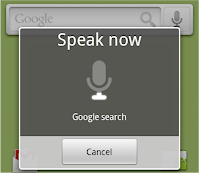
You can post your public buzz simply by speaking it. From the Google Mobile App for iPhone or Quick Search Box on Android, select the voice search icon, say "post buzz" followed by the text youd like to post, and watch your words appear. Before your post is sent, youll be able to edit it or change its tagged location.

2. Filter the Nearby tab for a specific place.
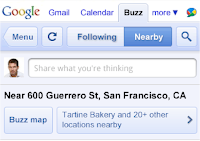
From the Nearby tab, you can easily filter buzz by a specific place, such as a sushi restaurant youre about to walk by, to only see posts from that place. Open the menu showing nearby places, for example "Tartine Bakery and 20+ other locations nearby," and then select a specific place from the list. Now, youll see all the public buzz anyones ever posted from that place or you can quickly create a post that is tagged with the place. To go back, just open the same menu and select your current location shown with the blue dot. Youll once again see all the recently posted buzz around your location.

3. Search!
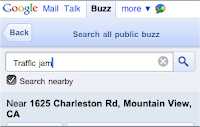
As youd expect from any Google product, Google Buzz for mobile has a powerful search feature that lets you search all public buzz for topics that interest you. Open the menu or just select the magnifying glass icon to see the search bar. You can also search specifically for nearby posts by checking the "Search nearby" box before submitting your search (its already checked if youre in the Nearby tab). Now you can find out what people around you are saying about the closest pizza spot or a traffic jam.

4. Post from your city-level location.
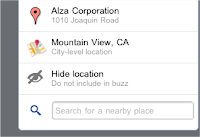
Tagging a post with your location is easy and adds context to your buzz posts. Sometimes, your post isnt about a specific place or youd rather not share your exact location. You can easily show your city-level location, so your post has a general city location tagged and will be browsable in the Nearby view and Maps Buzz layer. When posting, just select the ">" in the location box, scroll down, and select the city-level location option.

5. Refresh your location.
On the other hand, sometimes you really want your location to be exact. When you visit the Nearby tab or want to tag your post with a location, Google Buzz will try to get your location using your phones GPS. If youre not happy with the location accuracy, youre moving, or youre just stepping outside to get a GPS signal, hit the refresh icon to tell the Google Buzz web app to get your location again. You can also learn more about troubleshooting location problems.

Stay tuned for more tips! Visit our Help Center to learn more or tell us your feedback and questions in our Help Forum. You can also give us suggestions and vote on other people’s on the Mobile Product Ideas page.


Read More..

Saturday, March 15, 2014

Beauty On the Outside High Replication on the Inside

Today we launched Google Art Project in collaboration with 17 of the world’s most renowned museums. Google Art Project is built on top of App Engine and lets you take virtual tours of famous museums using internal Street View technology, view high resolution images of famous art work, and create personal virtual artwork collections.


When Art Project started development several months ago, the team built the application using Java and the Master/Slave Datastore. However, as their launch date approached, we released the new High Replication Datastore configuration. With a scheduled maintenance period so soon after the site’s launch, they decided to switch over to the High Replication Datastore.


Before switching, they ran a load test to set a performance baseline for comparison after the application’s data was migrated. Now that the application has launched, we wanted to share the results of the test with you as an example of what to expect after a switch to the High Replication Datastore. Below are the mean numbers for latency of different parts of the site.


Here’s a description of what each page does behind the scenes:


Homepage: This is the landing page that just serves a static webpage for site navigation. Since this page does not pull information from the datastore, the latency is stable.


Collections: Art Project lets users create individual museum collections. These load tests specifically targeted adding and deleting paintings from a user’s personal collection, as well as rendering those collections. We notice the slightly increased latency from saving and deleting entities in the datastore.


Level Maps: These pages simply performed get() calls on the datastore using entity keys. Latency on these pages is consistent across instances.


Info Spots: This handler performs the most data intensive calculations of all of the handlers. It calculates all line of sight interest points for a user’s map position in a museum gallery room, and saves the points of interest to the datastore for that location. The good news is, this calculation doesn’t have to happen for every user. Once this data has been calculated for a given spot, it can re-used for other visitors to the site.


As you can see, while there was some increased latency when switching to the High Replication datastore, the site latency is still very low. And the migration required no major code changes and no modification to the datastore structure between the two load tests.


For more information about the High Replication Datastore, see the Datastore documentation. The next scheduled maintenance period for the Master/Slave datastore is February 7th, 2011 from 5pm - 6pm PST. The High Replication datastore and Google Art Project will not need to be read-only during this period. On the High Replication Datastore, your application won’t need to be either.


Read More..

Upload photos to Panoramio straight from your iPhone!

Panoramio is a community of people who enjoy sharing photos of places with the rest of the world. These photos are surfaced in Google Earth and Google Maps as photo layers, where millions of users can see them.

Panoramio has just launched an application that makes it easy to upload photos to Panoramio straight from your iPhone. Read about it on the Panoramio Blog. Also, were working hard on the Android version, so keep an eye out for it!


Posted by Fernando Delgado, Product Manager, Panoramio Team
Read More..

Friday, March 14, 2014

1 6 6 SDK Released


While the Search API was a feature that was just so exciting we couldn’t wait to share it, we still have our regularly scheduled release for May full of new offerings, fixes and refinements with a little something for everyone.


Search API


For the Search API, we’ve included a change that displays the current experimental quota limits in the Admin Console. Weve also made several bug fixes and small naming changes in the API to improve consistency. 


Service Refinements


As a result of the Master/Slave datastore deprecation, new users will no longer be able to create new Master/Slave applications. We strongly suggest that developers move their existing Master/Slave applications to HRD.


Feature Updates


We are always looking for ways to remove our system limits so that developers can get the most out of the App Engine platform. With this release, apps that have billing enabled can now configure up to 100 cron jobs.


Lastly, we will be prompting a small percentage of admin console users each week to participate in an optional user satisfaction survey.


Of course, we can’t get to all the new things we have for you here, so don’t forget to read the full release notes for Python, Java, and Go. Stack Overflow for App Engine is an amazing way to get technical help from the community and members of the App Engine team, and we continue the lively discussion about App Engine over on our Google Group.


- Posted by the Google App Engine Team


Interested in working with the Google App Engine team? We are hiring solutions architects to help support our premier customers and engage with the community to broaden the impact of Googles cloud offerings.
Read More..

The new Cloud Console designed for developers

In June, we unveiled the new Google Cloud Console, bringing together all of Google’s APIs, Services, and Infrastructure in a single interface. Across Google, we want to make sure that you have an easy way to work and build across all of our platforms. That’s why we’re focusing on improvements to the Cloud Console so you can get things done faster.


We’re introducing a new navigation bar, making it easier to switch between pages. The new bar is designed to automatically resize- expanding sections as you need them and collapsing them when you don’t.


Our URL design got some love as well. In addition to being user-visible, URLs are useful permalinks to specific views for bookmarking and sharing. We’ve heard this feedback from several developers, and our response is our new RESTful, human-readable URL structure.


There are changes behind the scenes as well. The Google Cloud Console is implemented on Google App Engine, and as of this redesign we are now using Angular JS as well. App Engine makes it easy for us to build a RESTful, autoscaling backend to power our app, and Angular JS makes it simple to communicate with our backend to dynamically render content in the frontend.


This refresh is a first step towards improving your experience, and we are just getting started. Going forward, we’re working on a set of design standards and shared components that we’ll adopt throughout all of our services in the console. We’re also continually running user studies to study common developer workflows to see how we can improve them. If you would be interested in participating in any of these studies, please sign up here.


-Posted by Akshay Kannan, Product Manager
Read More..

Thursday, March 13, 2014

Janji Sudah Tertagih dan Artinya All is Over

Hari ini tanggal 04 desember 2010 hmn skitar jam 5 sore, gw nemuin dia utk yg terakhir kali nya.
Ya ini jelas utk yg terakhir.
Janji gw dulu yg pernah terbengkalai dlm beberapa episode (sinetron kalee woyyy T_T) akhirnya tertagih dan terlunasi sudah.
Sebelumnya gw sempat was-was akan janji yg ga kesampaian ini.
Ya gmn ngga kerasa terteror sendiri walau ga di teror sebenarnya whuahauhaua!(cerita sebelumnya)

Tanpa salam pembuka gw lgsg manggil dia utk nemuin gw.
Blablablablablabla...Selesai,janji gw uda selesai setelah memberikan itu.
Dgn ucapan penutup "lebih kurang mohon maaf" gw lgsg pamit without say good bye or anything.
Dengan santai nya gw mnuju meja dimana gw letakin laptop sbelumnya.
Agak deg-degan seh. Dikit hahahhaa.
Mgkn perasaan gw aja kali ya hahaha. Entah lah!

Oke finally.
Is all over.
Gw senang dengan terbebas nya dari "bagian" itu.
Bisa dibilang gw merdeka kembali hahaha (lebe lo -,-")

Uda itu aja.
Smua uda clear and Ill be fine to enjoying day now.
Yihaaa...(loncat-loncat)


Read More..

Nokia will make a major announcement in Delhi on May 9

Nokia will hold a major announcement in New Delhi on May 9. The Finnish manufacturer sent out invitations calling for a "time to shift gears".


Curiously, Nokias Indian announcement precedes the company’s scheduled Lumia event in London by five days. The latter will likely be the place where the companys next Windows Phone flagship will break cover.

Theres no word on the subject of Nokias New Delhi announcement. Our guess is that it might be one or more new members of the Asha family, as it is quite popular in India.

Source
Read More..